Personal Project
DoodleWrap

DoodleWrap — Kids' Drawings, Real Car Wraps

Print a coloring sheet, let the kids go wild with crayons, snap a photo, and get a custom wrap for your Tesla that shows up in the car and the Tesla app.

Computer VisionHomographyImage InpaintingUV MappingTypeScriptNext.jsCloudflare Edge

The Problem

Tesla vehicles support custom wrap images, and every model publishes a UV template. But those templates are flattened panel layouts: a hood here, a door there, a fender rotated sideways.

A grown-up can work with that. A toddler can't. Kids draw cars from the side, the way they see them on the street, not as an exploded bird's-eye diagram.

The Idea

Give kids one big, friendly car to color, and let software do the hard part: figuring out which crayon stroke belongs on which panel of the real car.

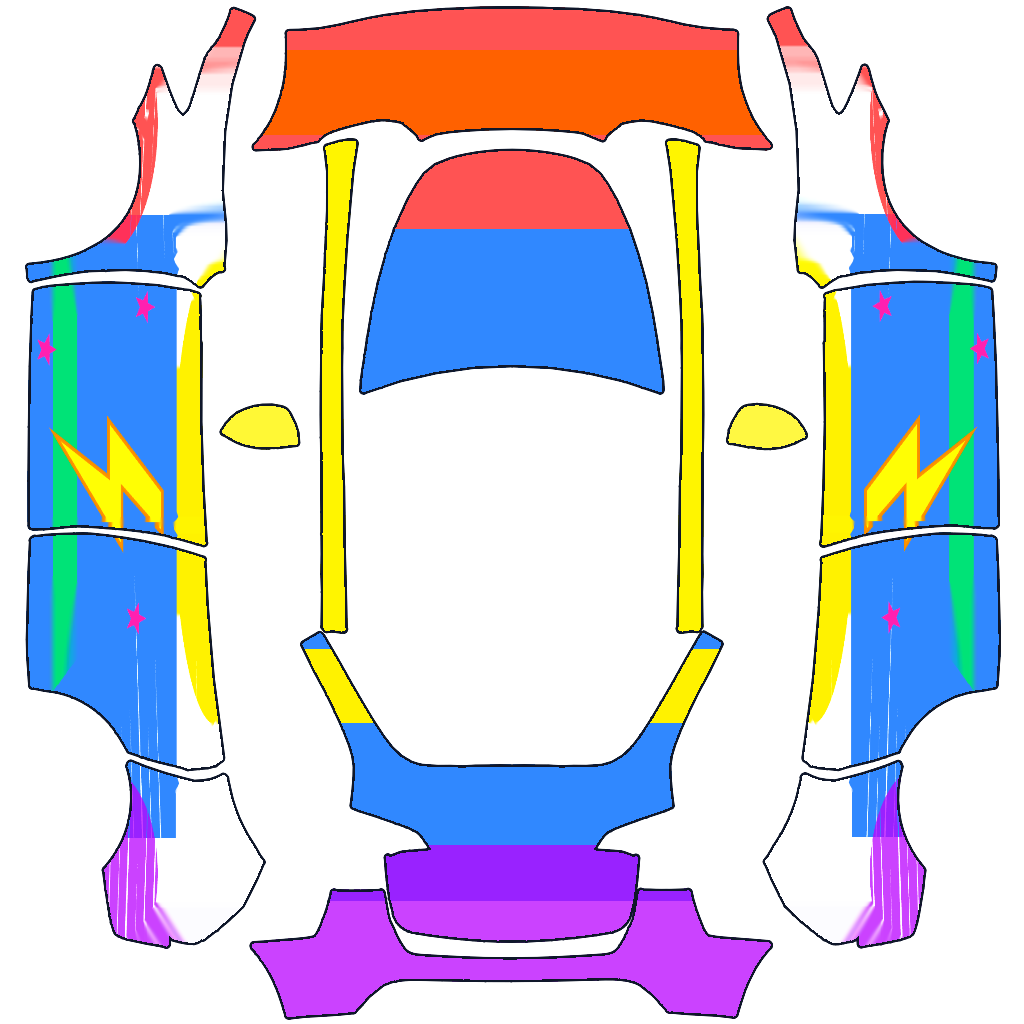
The sides show the drawing itself. The hood, roof and trunk (which a side view can't show) take matching colors from the front, middle and back of the drawing.

How It Works for Parents

Print & Color

Pick your model and print a landscape coloring sheet from your phone. There's also a draw-on-screen mode for tablets when there's no printer around.

Snap a Photo

Take a photo with all four corner squares in view. The app finds the sheet automatically, from any angle, and straightens it.

Upload to the Car

Save the wrap to Photos, then upload it in the Tesla app. Supports 12 Model 3, Model Y, Model S, Model X and Cybertruck variants.

From Crayon to Car

A real run through the app: the colored Model Y sheet on the left becomes the wrap file on the right. The lightning bolt and stars land on the doors, the red nose on the hood and front bumper, and the purple tail on the trunk.
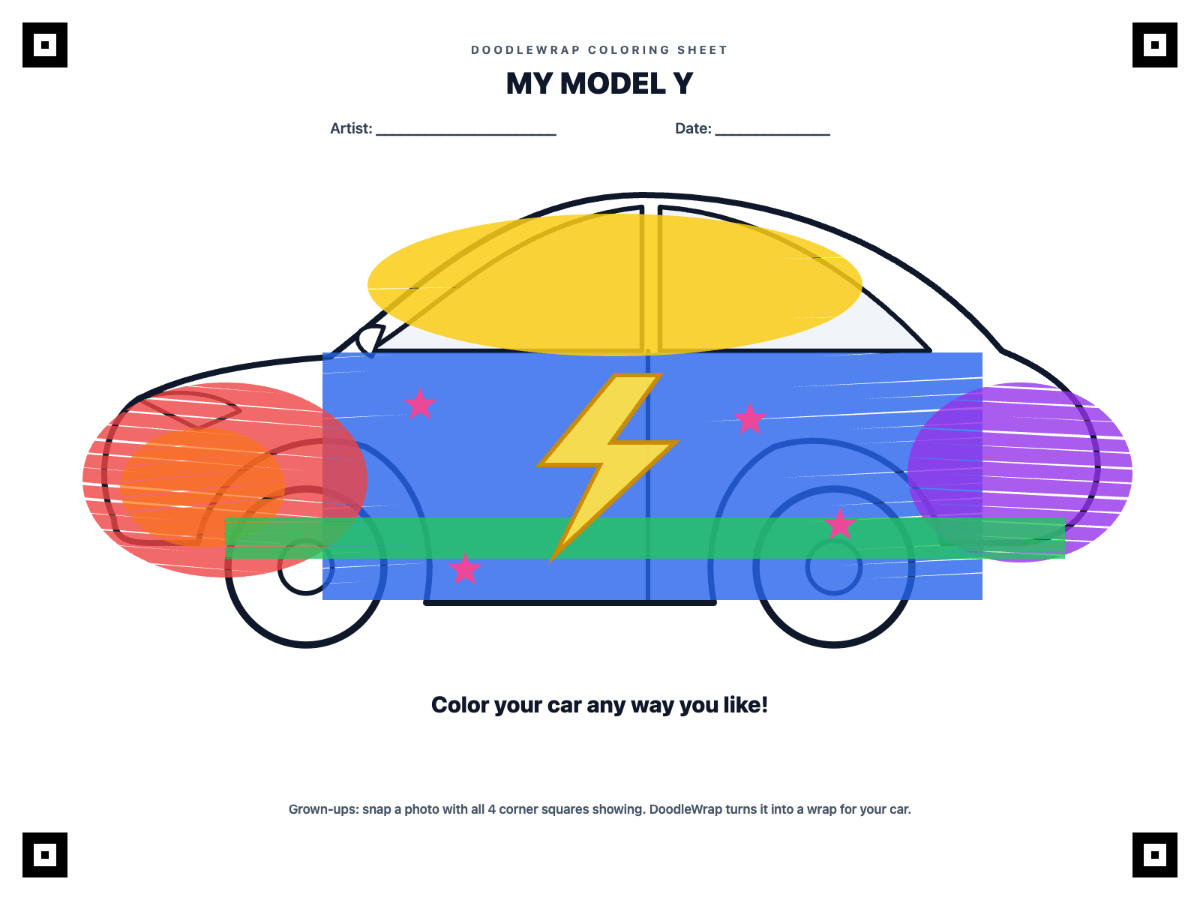
Before: the kid's coloring sheet

A colored DoodleWrap sheet: a side-view car with a red nose, blue doors, a yellow lightning bolt, pink stars and a purple tail

After: the Model Y wrap file

The generated Model Y wrap layout, with the drawing mapped onto both sides and matching colors on the hood, roof rails and trunk

The Technology Behind the Magic

Seven stages turn a crayon drawing into a file the car understands. The whole computer-vision pipeline is hand-written TypeScript running in the browser, with no CV libraries and no server, so kids' artwork never leaves the phone.

1

Capture

Crayon drawing on paper → Photo in the browser

The parent takes a photo with the phone's own camera. The image is decoded straight into a canvas on the device and never uploaded.

HTML Media CaptureFileReader APICanvas 2D
2

Find the sheet

Messy phone photo → 4 corner points

The four square-ring targets are found even in dim or uneven light. The sheet's shape and its bold title show which way up it is, so sideways and upside-down photos work too.

Integral imagesAdaptive thresholdingConnected-component labelingConvex-quad searchInk-coverage orientation check
3

Straighten it

Tilted, skewed photo → Flat 1600×1200 sheet

A perspective transform maps the photo back onto the flat sheet, then white balance and a saturation boost bring the crayon colors back to life.

Homography (DLT)Gaussian eliminationBilinear interpolationWhite balanceSaturation boost
4

Keep only the coloring

Drawing + printed lines → Pure crayon color

The blank sheet is rendered to find everything that was printed (outlines, wheels, windows, text), and those pixels are filled in from the child's surrounding colors.

SVG rasterizationSilhouette maskingMorphological dilationDiffusion inpainting
5

Read the car's panels

Tesla wrap template → Labeled panel map

Each model's template is flood-filled into its paintable panels, which are grouped into hood/roof/trunk and the two sides. All 12 model variants work without hand-placed coordinates.

Flood-fill segmentationMulti-source BFSZone classificationPer-model layout cache
6

Paint the wrap

Side-view drawing → Full 360° car wrap

The drawing is stretched along both sides of the car. The hood, roof and trunk take the main crayon color from each slice of the drawing, front to back.

Affine transformsColor quantizationDominant-color histogramsNearest-color gap fill
7

Export to the car

Wrap canvas → PNG in the Tesla app

A clean PNG at the template's exact size, kept under the Tesla app's 1 MB upload limit, and saved to Photos with the phone's share sheet.

PNG encodingAdaptive posterize + blurWeb Share API

Tech Stack

App

Next.js 16 (static export)React 19TypeScriptTailwind CSS v4

Image processing

Canvas 2DHand-written CV in TypeScriptNo CV librariesRuns 100% on-device

Delivery

Cloudflare Workers static assetsWorkers Builds CI/CDCustom domain on the edge

Hosting & Privacy

Zero-Backend Edge Delivery

A Next.js 16 static export served as static assets on Cloudflare's edge at doodlewrap.dheepstack.com. Every push to main is built and deployed by Cloudflare's Git integration. There's no server, no database, and nothing to scale.

Privacy by Design

Image processing, file assembly and export all run on the device. Saving uses the phone's native share sheet (Web Share API), so a parent can drop the wrap straight into Photos.

Template-Driven, Not Hard-Coded

Panel positions are read from each model's own template at runtime and cached, including the Cybertruck's horizontal layout, where panels are split along the roof seams.

Mobile-First UX

Built for a parent holding a phone. It prints straight from the phone, uses the native camera, and places the corner pins automatically, while still letting you drag them.

Let the Kids Design the Car

Try it with the built-in demo artwork, or print a sheet and hand over the crayons.

Open DoodleWrap (doodlewrap.dheepstack.com) ↗

DoodleWrap is an independent project and is not affiliated with, endorsed by, or sponsored by Tesla, Inc.